8. Tuning Guide
Tune your Engagement Index, focus classifier, and signal processing parameters to match your hardware and use case.
When to Tune?
You'll know it's time when:
| Symptom | Parameter to Adjust |
|---|---|
| EI curve is too jumpy, hard to read | Increase EMA Alpha |
| EI reacts too slowly to mental state changes | Decrease EMA Alpha |
| Alert triggers too often / too rarely | Adjust Alert Threshold |
| Focus baseline feels unstable | Increase Baseline Seconds |
| Focus output feels too frequent / too sparse | Adjust Decision Seconds |
| Device takes a long time to settle | Increase Warmup / Initial Unreliable |
Two Ways to Tune
Method 1: Environment Variables (Permanent)
Best for: deploying to a known hardware setup, or sharing config with a team.
cp .env.example .env
# Edit .env with your values
npm run build
Values are burned into the build. Change requires rebuild.
Method 2: Advanced Tuning Panel (Runtime)
Best for: experimenting, dialing in parameters interactively.
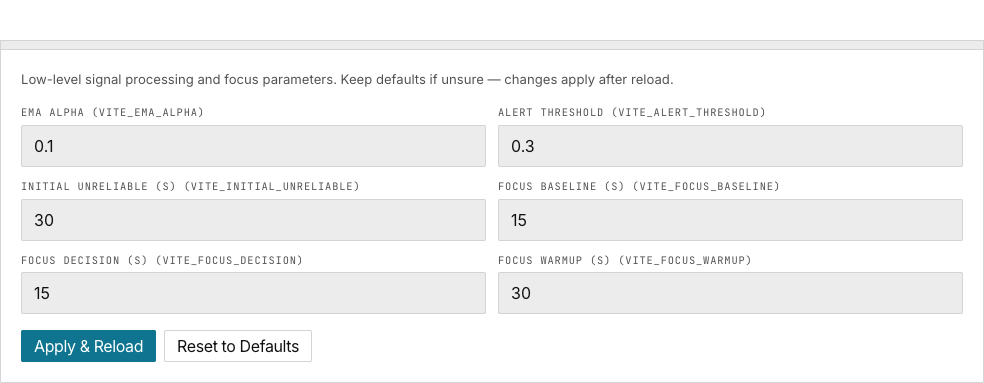
- Go to the System page
- Expand Advanced Tuning (click the chevron)
- Adjust sliders and inputs
- Click Apply & Reload — the page refreshes with new values
- Test your changes immediately
Values are stored in localStorage. They override .env and built-in defaults.
Parameter Reference
EMA Alpha
Env: VITE_EMA_ALPHA · Default: 0.1 · Range: 0.01 – 1.0
Controls how much smoothing is applied to the Engagement Index trend:
smoothEI = α × rawEI + (1 − α) × prevSmoothEI
| α | Behavior | When to Use |
|---|---|---|
| 0.05 | Very smooth, ~20 sample lag | Noisy hardware, very slow mental state changes |
| 0.10 | Smooth, ~10 sample lag | Default — works for most setups |
| 0.25 | Moderate, ~4 sample lag | Clean signal, want to see changes faster |
| 0.50 | Responsive, ~2 sample lag | High SNR hardware, rapid state detection |
| 0.80 | Almost raw values | Debugging, verifying your signal quality |
Tip: Start at 0.1. If the EI line is too jittery, go lower. If it's too sluggish, go higher.
Alert Threshold
Env: VITE_ALERT_THRESHOLD · Default: 0.3 · Range: 0.1 – 2.0
The horizontal red line on the EI trend chart. When EI drops below this value, the curve turns red — signaling potential disengagement.
| Threshold | Behavior | When to Use |
|---|---|---|
| 0.2 | Very loose — almost never triggers | You want alerts only for extreme disengagement |
| 0.3 | Loose — triggers on clear disengagement | Default — conservative |
| 0.5 | Moderate — balanced sensitivity | Most users after initial tuning |
| 0.7 | Strict — subtle drops trigger | High SNR, want early warnings |
| 1.0+ | Very strict — triggers often | Not recommended for most setups |
Note: The alert threshold also affects the AI focus inference pipeline. Changing it impacts both the trend chart visual and the AI's interpretation.
Initial Unreliable / Focus Warmup
Env: VITE_INITIAL_UNRELIABLE + VITE_FOCUS_WARMUP · Default: 30 · Range: 10 – 120
Seconds to skip at stream start for device settling. Data during this period is excluded from CSV, EI trend, and focus classification.
| Seconds | Behavior | When to Use |
|---|---|---|
| 20 | Quick start | Clean hardware that stabilizes fast |
| 30 | Moderate | Default — adequate for most devices |
| 60 | Conservative | Noisy hardware, long settling time |
Critical:
VITE_FOCUS_WARMUPmust be the same value asVITE_INITIAL_UNRELIABLE. If they differ, focus calibration will not align with data collection.
Focus Baseline
Env: VITE_FOCUS_BASELINE · Default: 15 · Range: 10 – 120
How many seconds of EI data are collected to compute your personal baseline reference (median EI).
| Seconds | Behavior | When to Use |
|---|---|---|
| 15 | Quick baseline | Default — fast calibration |
| 30 | Moderate | More stable baseline |
| 60 | Very stable | Unstable hardware, inconsistent mental state |
Tip: Choose a calibration video that induces your target baseline state (e.g. a calm nature video for a relaxed baseline). The baseline is the reference point for focus classification.
Focus Decision
Env: VITE_FOCUS_DECISION · Default: 15 · Range: 5 – 300
How often (in seconds) the classifier emits a Focused or Not focused output point.
| Seconds | Behavior | When to Use |
|---|---|---|
| 10 | Frequent outputs | Short tasks, fast feedback loops |
| 15 | Moderate | Default — balanced |
| 30 | Sparse outputs | Long monitoring sessions |
| 60+ | Very sparse | Trend analysis, not real-time feedback |
Each decision window compares the median EI of that window against your baseline reference.
Scenario Recipes
Scenario A: Noisy Hardware
Your EEG device has a higher noise floor. EI jumps around a lot.
VITE_EMA_ALPHA=0.1              # heavy smoothing
VITE_ALERT_THRESHOLD=0.3        # loose trigger
VITE_INITIAL_UNRELIABLE=60      # long warmup
VITE_FOCUS_WARMUP=60            # must match
VITE_FOCUS_BASELINE=30          # longer baseline
VITE_FOCUS_DECISION=30          # longer decision window
What you'll see: Smooth EI line that only moves on real mental state shifts. Fewer false alerts. Slower startup.
Scenario B: High SNR, Fast Response
Clean signal, need immediate feedback for real-time applications.
VITE_EMA_ALPHA=0.35             # responsive
VITE_ALERT_THRESHOLD=0.6        # strict trigger
VITE_INITIAL_UNRELIABLE=20      # quick startup
VITE_FOCUS_WARMUP=20            # must match
VITE_FOCUS_BASELINE=15          # fast baseline
VITE_FOCUS_DECISION=10          # frequent outputs
What you'll see: Sharp EI response to mental state changes. Earlier warnings. Faster calibration cycle.
Scenario C: Default (General Purpose)
Start here. Adjust only if needed.
VITE_EMA_ALPHA=0.1
VITE_ALERT_THRESHOLD=0.3
VITE_INITIAL_UNRELIABLE=30
VITE_FOCUS_WARMUP=30
VITE_FOCUS_BASELINE=15
VITE_FOCUS_DECISION=15
Parameter Interaction Map
VITE_INITIAL_UNRELIABLE  ← must match →  VITE_FOCUS_WARMUP
         │                                      │
         └── affects: CSV, EI trend, focus ─────┘

VITE_ALERT_THRESHOLD
    ├── AlgorithmTrendPanel (red line on chart)
    └── fiveBandInference.ts (AI focus inference)

VITE_EMA_ALPHA
    └── eegStore.smoothEngagementResults (EI smoothing)

VITE_FOCUS_BASELINE + VITE_FOCUS_DECISION
    └── focusCalibration.ts (state machine)
How to Iterate
- Start with Scenario C (defaults)
- Stream for 2-3 minutes, watch the EI trend
- If the line is too jittery → increase EMA Alpha
- If alerts fire too often → raise Alert Threshold
- If focus baseline feels off → increase Baseline seconds
- Apply one change at a time, test for 2+ minutes
- Once you find good values, save them to
.envfor production
Don't change multiple parameters at once — you won't know which one caused the effect.